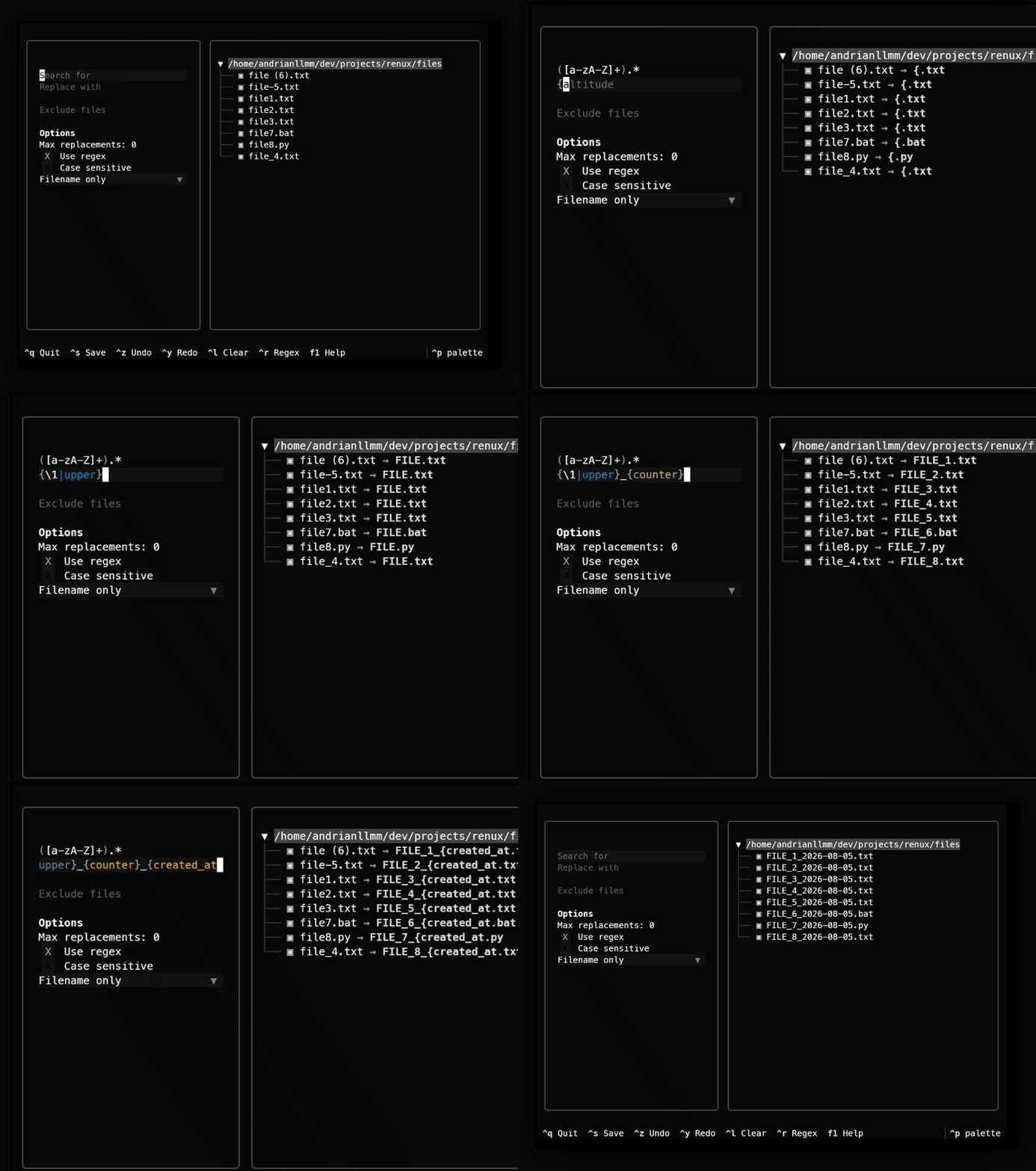
renux is a terminal-based bulk file renamer for nerds who spend most of their time in the command line.
It combines regex, placeholders, and text transformations inside an interactive terminal interface, making it easy to clean up photo collections, download folders, or enforce consistent naming conventions.
Why I built it
I’m particular about naming things, whether it’s Git branches, commit messages, folders, or files. I’m the person who insists on Conventional Commits and gets bothered by a folder that mixes camelCase and snake_case.
I used to reach for Microsoft’s PowerRename for bulk renames. It worked, but as I spent more time in the terminal, I got tired of switching to a GUI just for that.
renux started as my final project for Harvard’s CS50p1, but it quickly became a tool I wanted to keep using: something that felt at home in the terminal while staying safe and easy to use.
How it turned out
Interactive terminal interface
Unlike batch renamers that require memorizing long command invocations, renux shows a text-based interface where you preview every rename before applying it. The preview updates live as you change patterns and replacement rules, so mistakes get caught before they touch the filesystem.
Regex-powered renaming
Simple find-and-replace works for many cases, but real folders are usually messier. renux supports regular expressions, capturing groups, and replacements, so you can preserve parts of a filename while restructuring the rest. For example:
renux my_documents "document (\d).pdf" "doc (\1).pdf"becomes
document 1.pdf  ->  doc 1.pdf
document 2.pdf  ->  doc 2.pdf
Placeholders and text transformations
Beyond regex, renux includes placeholders: append incremental counters, insert creation or modification dates, or transform filenames into snake_case, camelCase, kebab-case, slugified text, uppercase, lowercase, and more. Useful for organizing photos, datasets, or any collection where filenames follow a predictable pattern.
Traditional CLI support
renux can also be called directly from scripts and shell commands without going through the TUI, so it’s easy to automate. I use it regularly now to rename photos, downloads, and project assets. It started as a CS50 assignment and became the tool I instinctively reach for whenever a folder gets messy.
How I built it
The project is written in Python using Textual for the terminal interface.
Internally, the rename engine separates matching from transformation. A filename first passes through pattern matching, where regex or plain text determines which parts should change. The replacement string is then parsed for placeholders like counters, dates, and text transformations before producing the final filename. Keeping those stages separate made it easier to add new features without them interfering with each other.
I also wanted renaming to feel safe, so the interface previews every rename before touching the filesystem, and supports undo and redo. The core rename engine stays independent from the interface, so the same logic powers both the TUI and the CLI mode.
What I learned
This project made me appreciate that developer tools are products too. A good rename engine wasn’t enough; live previews, keyboard shortcuts, and undo mattered just as much as regex support, because they made the tool feel safe to use.
It was also my first proper terminal application. Before this, I mostly thought of terminals as places where commands printed text. renux showed me they can be rich and interactive without ever opening a graphical window.
The most rewarding part has been seeing people actually use it. What started as a course project has grown into an open-source tool with over 10,000+ PyPI downloads and 50+ GitHub stars.
Footnotes
-
Harvard’s Introduction to Programming with Python (CS50p) was one of the first online CS courses I completed. This project served as my final capstone. ↩