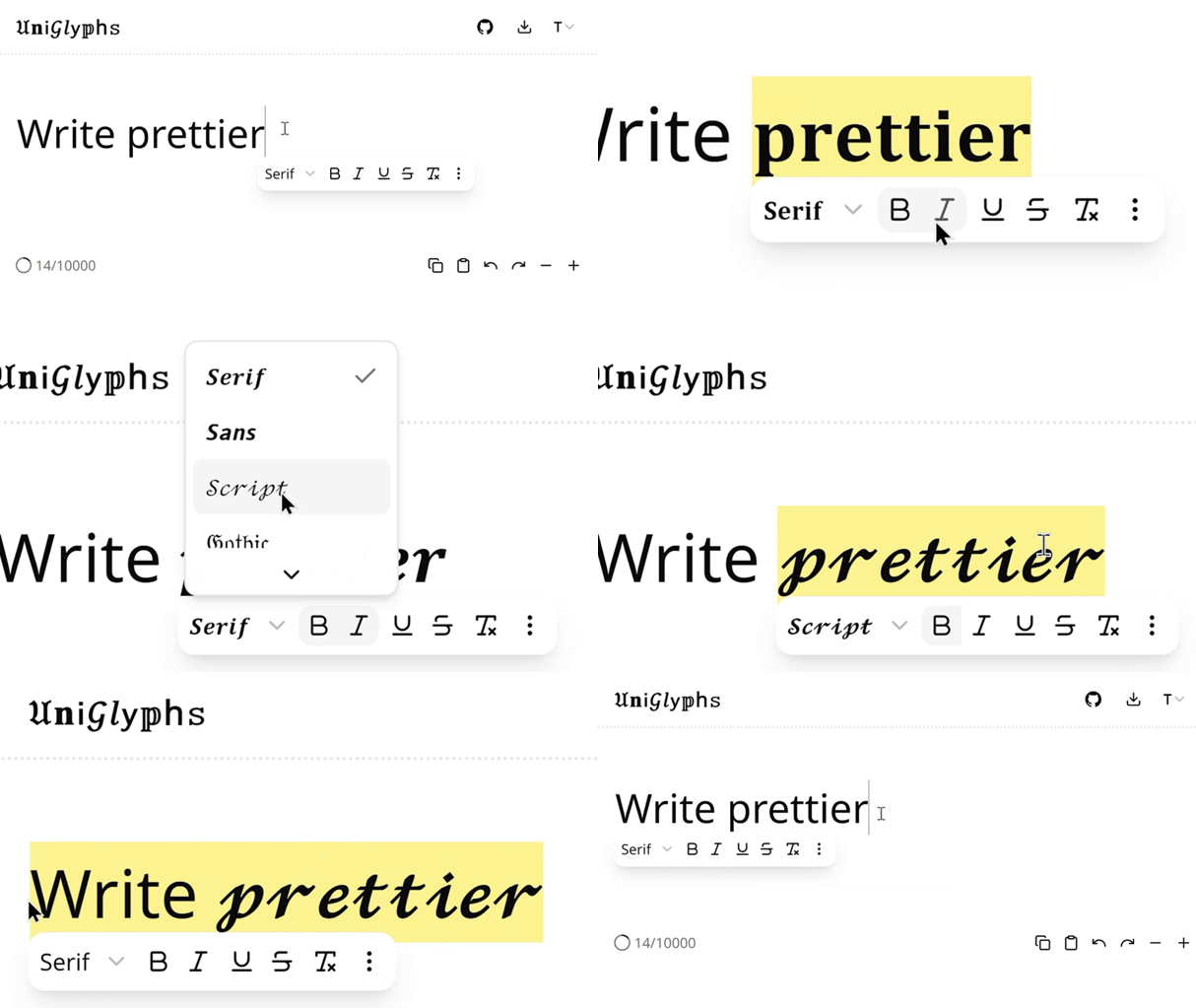
𝔘𝐧𝗂𝒢𝑙𝗒𝕡h𝚜 is a browser extension that lets you format text directly on sites like Facebook, X (formerly Twitter), LinkedIn, and many more. Just highlight some text, and an inline toolbar appears so you can format it without leaving the page. There’s also a full-page editor and a popup version if you want more room to work.
Instead of relying on platform-specific formatting, UniGlyphs converts text into Unicode characters that resemble styles like bold, italic, or 𝔤𝔬𝔱𝔥𝔦𝔠. Since they’re actual Unicode characters rather than HTML formatting, the styling stays intact wherever the text is pasted.
Why I built it
I first noticed people posting formatted text on platforms that don’t officially support it, especially Facebook, Messenger, and LinkedIn. When I started using LinkedIn more, I wanted to do the same thing, and was surprised there was still no built-in way to make text bold or italic despite seeing posts that somehow did it.
Every solution I found worked the same way: open a website, paste your text, generate Unicode characters, copy everything back, then return to whatever you were writing. The formatting wasn’t the problem. The workflow was.
UniGlyphs started as my final project for Harvard’s CS50x1, but I wanted it to solve an annoyance I actually had. Instead of another Unicode generator website, I built the tool I wished existed.
How it turned out
Inline formatting toolbar
The main feature is an inline toolbar that appears while editing text, so instead of switching tabs to generate formatted text, you apply formatting without leaving the page. The selected text gets replaced immediately, closer to a native rich text editor.
Multiple editing modes
Not every website behaves the same way, so besides the inline toolbar, UniGlyphs also has a popup editor and a full-page editor for when you want more space to write before copying text elsewhere.
Unicode-based formatting
Rather than injecting HTML or relying on platform support, UniGlyphs converts characters into their Unicode equivalents, so formatting works almost anywhere text can be pasted, including sites that normally strip HTML formatting. Supported styles include:
- Bold
- Italic
- Underlined text
- Monospace
- 𝒮𝒸𝓇𝒾𝓅𝓉
- 𝔊𝔬𝔱𝔥𝔦𝔠
- 🄲🄸🅁🄲🄻🄴🄳
- and many more
How I built it
Technologies I used
| Web | Next.js, React, Vercel |
| Extension | WXT |
| Styling | Tailwind CSS, shadcn/ui |
| Monorepo | Turborepo |
Building the browser extension turned out to be much harder than I expected. Unlike a normal web app where you control the entire page, an extension has to coexist with whatever website it’s running on. Every platform has its own DOM structure, CSS, and input behavior, so even showing a toolbar consistently was surprisingly tricky, including injecting it without interfering with the host page and keeping it consistent across different types of editable fields.
The formatting engine itself is straightforward: each style maps ordinary characters to their Unicode equivalents before replacing the selected text. Since not every Unicode style supports every character, the extension also surfaces that limitation so people know when a letter can’t be transformed.
What I learned
This project showed me how different browser extensions are from web apps. With a website you own the environment; with an extension you’re building on top of someone else’s, and every site brings assumptions, HTML structures, and edge cases you don’t control.
It also reinforced something I’ve noticed across a lot of my projects: I like building tools that fit naturally into existing workflows instead of forcing people to change them. Unicode text generators already existed. The interesting problem was making the formatting feel built into the websites themselves.
UniGlyphs only has a small number of users today, but it solved a problem I genuinely had and pushed me into a platform I’d never worked with before.
Footnotes
-
Harvard’s Introduction to Computer Science (CS50x) was one of the first online CS courses I completed. This project served as my final capstone. ↩